

Another commonly requested game for me to cover in the Install.sh series is Guild Wars 2.
It’s a surprisingly temperamental game, considering its age, but it should run on most Linux distros just fine.
Prerequisites
As always, the first thing to do is to check out the display driver situation.
New versions of Ubuntu install them automatically but if you are running Nvidia drivers and want to double-check, you can fire up Ubuntu’s Driver Manager and see what’s happening.
For AMD & Intel users, there’s an optional PPA to install the “latest & greatest” display drivers but the drivers that ship with Ubuntu are usually fine.
After the display drivers are installed, you’ll need to install Lutris.
Since Lutris isn’t included in Ubuntu’s standard set of repos (yet), you will have to install their PPA:
sudo add-apt-repository ppa:lutris-team/lutris && sudo apt update
You can install Lutris & all of the dependencies required for Guild Wars 2 in just one command:
sudo apt install lutris wine-stable
Install
Once Lutris is installed, you can launch it and search for “Guild Wars”.

There are currently two different entries for Guild Wars 2. The entry with the cover art is the real entry and the other entry doesn’t even have an install script associated with it.
But once you click the correct entry, there’s a bunch of different install scripts!
Some of the scripts at the bottom of the list are “optimized” for different graphics cards. Feel free to try out different scripts. However, the default script at the top of the list worked just fine for me.
Once Guild Wars 2 is installed and you run the launcher, you may notice the transparency around the launcher is broken. That’s “normal” and won’t affect the game at all.
Run
Launching Guild Wars is as easy a pressing the PLAY button in the launcher!
The first time I launched it, the game window flashed a few times and once I got to the character select screen, I couldn’t load into the game due to a network error.

If this or similar errors happen, just close the game completely (including the launcher) and re-launch the game. It worked fine after that.
I didn’t encounter any other issues or errors with the game.
Tweak
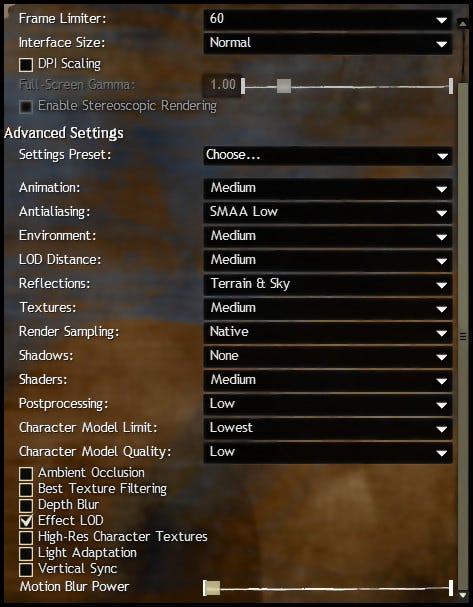
Guild Wars 2 seemed to default to the lowest graphics settings, but it ran pretty well. The frame rate was very stable so you could tweak the settings without risking lag spikes or stuttering.
On the topic of stuttering, there are reports of the game stuttering so badly on regular hard drives that it is unplayable.
Since Guild Wars 2 caches and loads assets from the hard drive on the fly, solid-state drives really shine here. My test rig uses an SSD so I can’t confirm this.
Summary
For an older Windows game with somewhat steep system requirements (for the time), Guild Wars 2 runs pretty well on Linux with Lutris & Wine.
There are reports of users having issues with certain hard drives but I didn’t encounter any roadblocks, besides that brief network error when I first launched the game.
